Cocoon’s generic CSV importer guesses columns from their headers, then reads each row’s date and supported type. An unrecognised type can become a journal note; an unreadable date is skipped. Check the preview and a few original rows before confirming an import. A readable CSV is not automatically a complete backup.
Try a worked example
Follow a CSV row into Cocoon
In the generic CSV parser, exact supported type values matter. An unrecognised type can become a note, an unreadable date is skipped, and a sleep row does not import its end time.
Teaching preview only. Six fixed fictional rows, tested against Cocoon’s generic parser. Nothing is uploaded or imported here. Numbers describe sample file contents, not feeding advice.
Row 1 · A recognised bottle
Timestamp: 2026-10-17T09:00:00+11:00
Type: feed_bottle
Amount: 90 ml
Duration: (empty)
End: (empty)
Notes: Fictional bottle example
Bottle record: 90 mL
The type is feed_bottle, the date includes an offset, and the amount is readable. In this generic bottle path the note is not carried into the bottle payload; keep the original file.
Row 2 · A human label is not a type code
Timestamp: 2026-10-17T10:00:00+11:00
Type: Bottle
Amount: 90 ml
Duration: (empty)
End: (empty)
Notes: Fictional label example
Journal note: Fictional label example
Without a custom mapping, Bottle is not one of the generic parser’s supported type values. The Notes cell becomes a note; the volume is not turned into a bottle measurement.
Row 3 · A bottle without an amount
Timestamp: 2026-10-17T11:00:00+11:00
Type: feed_bottle
Amount: (empty)
Duration: (empty)
End: (empty)
Notes: Amount not recorded in this fictional example
Journal note: amount not recorded
A bottle needs a readable positive volume. With none here, the parser falls back to the note instead of inventing a measurement.
Row 4 · An unreadable date
Timestamp: not-a-date
Type: note
Amount: (empty)
Duration: (empty)
End: (empty)
Notes: Fictional row with an unreadable date
Row skipped: no usable date
There is no timestamp for this row. Find the original date before fixing a working copy; do not substitute today just to make the row import.
Row 5 · A sleep duration is not restored
Timestamp: 2026-10-17T13:00:00+11:00
Type: sleep
Amount: (empty)
Duration: 60
End: 2026-10-17T14:00:00+11:00
Notes: Fictional sleep; end kept only in the original CSV
Sleep start: 13:00, with no end time
The generic sleep path retains the start and note. It does not use the Duration or End column for sleep. This row cannot reconstruct a completed 60-minute sleep.
Row 6 · A written memory
Timestamp: 2026-10-17T16:00:00+11:00
Type: note
Amount: (empty)
Duration: (empty)
End: (empty)
Notes: Fictional memory: laughing at the yellow socks
Journal note: laughing at the yellow socks
The note type and Notes cell preserve the words. The row does not include a photograph; a filename written in a CSV is not an attached image.
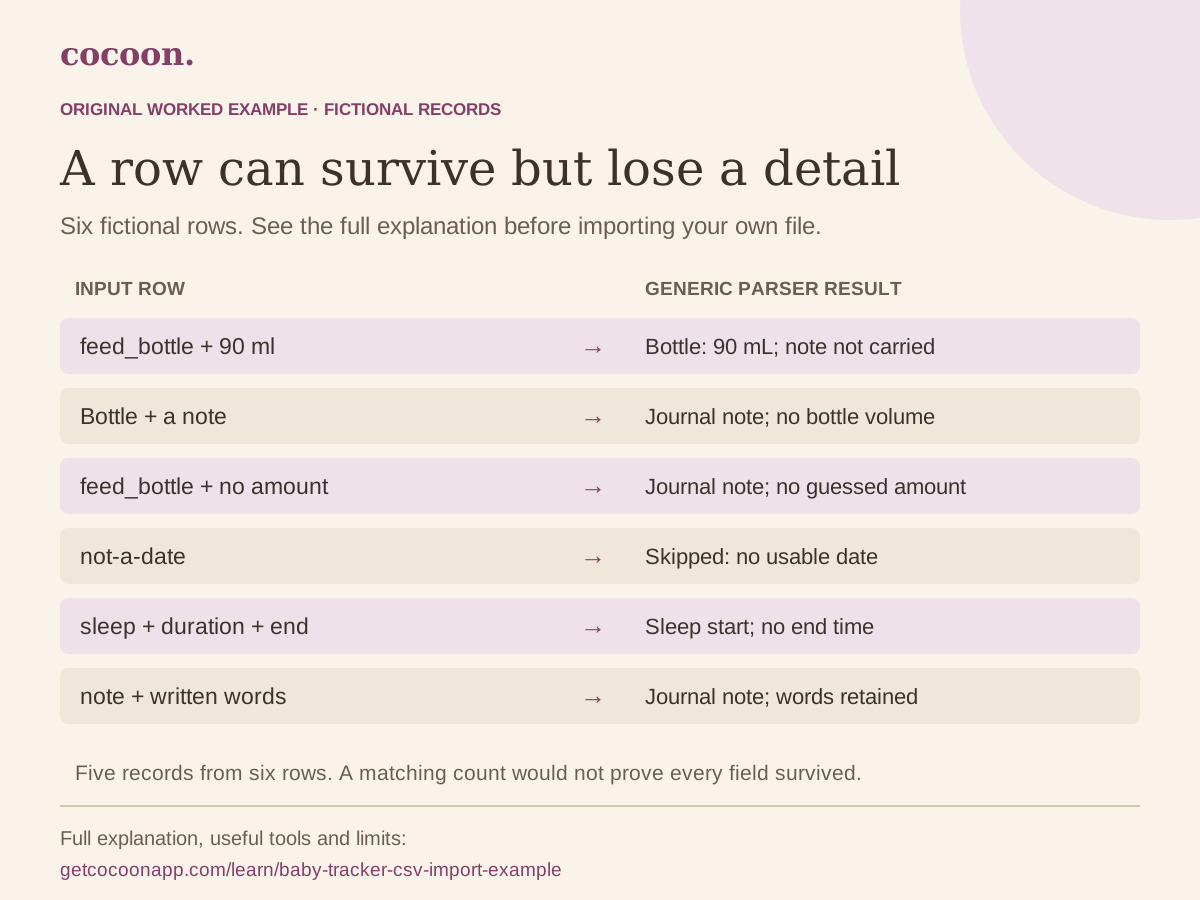
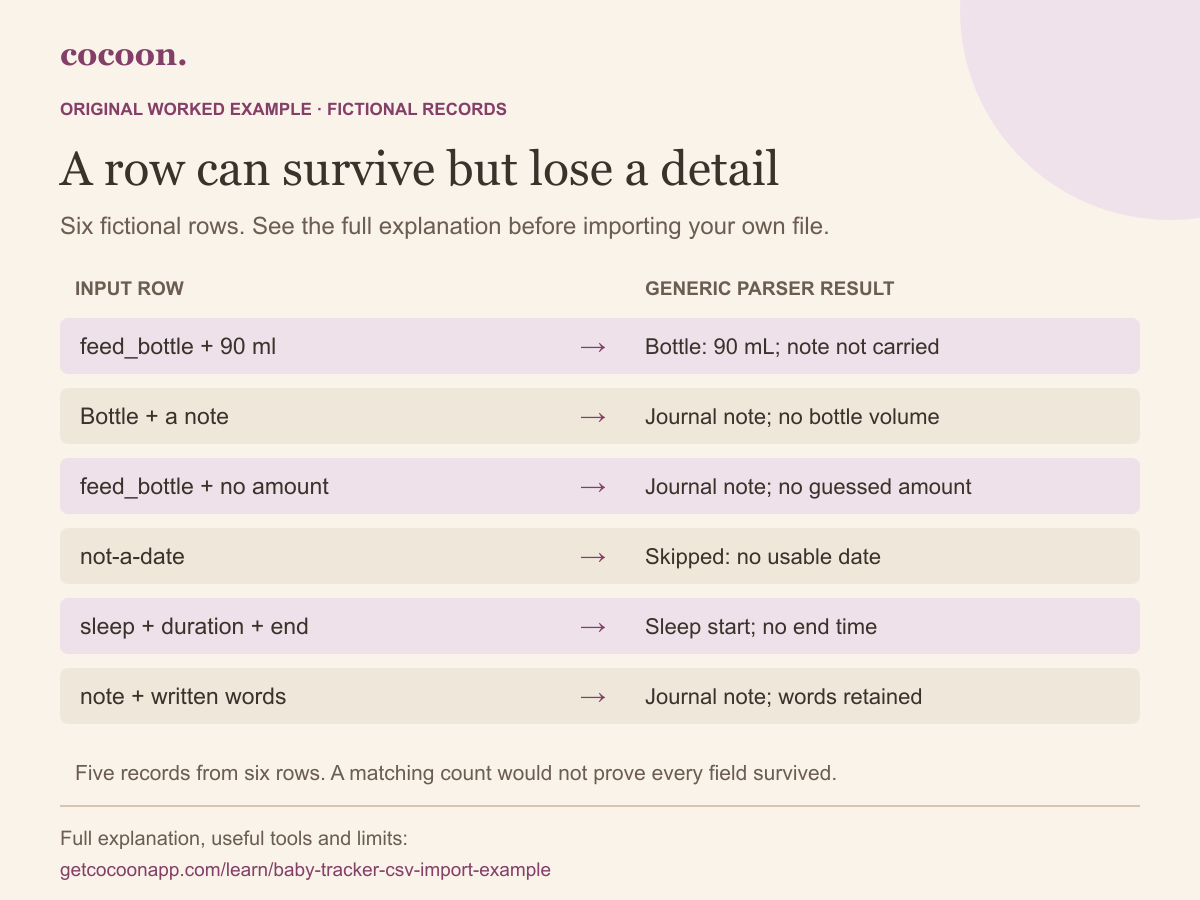
The file produces five records in the generic parser: one bottle, one sleep start and three notes. The unreadable-date row is skipped. The full six-row explanation remains available below.
Read all six row outcomes together
Fictional CSV outcomes
Input row
Result
What to check
A recognised bottle
Bottle record: 90 mL
The type is feed_bottle, the date includes an offset, and the amount is readable. In this generic bottle path the note is not carried into the bottle payload; keep the original file.
A human label is not a type code
Journal note: Fictional label example
Without a custom mapping, Bottle is not one of the generic parser’s supported type values. The Notes cell becomes a note; the volume is not turned into a bottle measurement.
A bottle without an amount
Journal note: amount not recorded
A bottle needs a readable positive volume. With none here, the parser falls back to the note instead of inventing a measurement.
An unreadable date
Row skipped: no usable date
There is no timestamp for this row. Find the original date before fixing a working copy; do not substitute today just to make the row import.
A sleep duration is not restored
Sleep start: 13:00, with no end time
The generic sleep path retains the start and note. It does not use the Duration or End column for sleep. This row cannot reconstruct a completed 60-minute sleep.
A written memory
Journal note: laughing at the yellow socks
The note type and Notes cell preserve the words. The row does not include a photograph; a filename written in a CSV is not an attached image.
Start with the fictional file, not your family history
The downloadable CSV contains six invented rows and no family information. It is a teaching file with deliberate problems, not a feeding timetable or a recommended import format for every app. Inspect it as plain text or in a spreadsheet. The interactive lab does not upload files or write anything to Cocoon.
The expected outcomes use Cocoon’s generic CSV path with automatic header guesses, as checked on 17 October 2026. These are Cocoon’s own checked examples; the linked public guides explain the import workflow. Use the CSV import guide for the actual workflow, or a dedicated source guide in the import hub when one exists. Product guide: CSV imports.
The sample headers are Timestamp, Type, Amount, Duration, End, Notes. The generic parser recognises Timestamp, Type, Amount, Duration and Notes. It does not map End to a sleep finish. Automatic guesses are convenient, but a familiar-looking column is not proof that its contents will be used.
An exact supported type such as feed_bottle is different from the human label Bottle. In this example, Bottle becomes a journal note using its Notes cell. A bottle row with a readable amount becomes a bottle, but its free-text note is not preserved by that generic bottle path. Keep the original file when context cannot be carried across.
Do not rely on a manual column-mapping screen: the current app flow uses automatic guesses for this path. The examples describe that behaviour rather than a future interface. Product guide: CSV imports.
Make dates and units unambiguous
The sample uses a timestamp such as 2026-10-17T09:00:00+11:00. The offset identifies the instant; the app may display it in your device’s local time. A different displayed clock label can represent the same instant. Compare the date, offset and time together.
A value such as 05/07/2026 is ambiguous without the source’s date convention. In Cocoon’s preview, check the offered date-order setting against the original file. Do not guess from your own location when the export came from a different convention.
The sample bottle amount is explicitly 90 ml. That number is fictional, not feeding advice. Preserve the original unit and inspect any conversion. A number in an unrecognised column, or a unit written only in a heading the parser does not use, may not mean what you intend. Product guide: CSV imports.
An imported sleep start is not a completed sleep
The sample sleep starts at 13:00, has a Duration cell of 60 and an End cell of 14:00. The generic sleep path imports the start and the note, with no end time. You cannot use that imported row alone to claim 60 minutes of recorded sleep. Prefer a dedicated supported export or a Cocoon JSON backup for a supported restore; keep the source record for any correction.
Likewise, a skipped bad-date row is missing information, not evidence that nothing happened. The record-confidence map shows how a smaller set of records can make an unchanged week look different. Product guide: CSV imports.
Check repeated rows before trying again
The generic parser distinguishes two identical rows in the same file by their occurrence number, so it does not simply discard the second. Re-import detection for events uses the source and content-derived identity within the selected child’s records. Editing cell contents can therefore change that identity; importing an edited file is not a promise to update the old entry. Product guides: CSV imports and import preview.
Before confirming, check the selected child, date-order setting, event types and duplicate counts. After a real import, inspect a few entries against the untouched original, including any note or overnight sleep you care about. A matching row count cannot prove that every field survived. Use the switching checklist to finish the move deliberately.
Sources and scope
Sources support the specific health, timekeeping or product context cited above; each has its own check date. The recording examples and templates are Cocoon’s own. External organisations are cited for context, not as endorsers. This article has not been independently clinically reviewed. Read our editorial standards and AI-assistance disclosure.